
Opus Clip AI Tutorial: How to Turn Long Videos into Social Media Clips
Creating long form content takes time.
Getting repeat value from it takes even more work.
Most marketing teams already have useful video assets sitting inside their folders:
- Webinars
- Podcasts
- Product walkthroughs
- Founder interviews
- Customer discussions
- Virtual events
- Educational sessions
But too often, one long video becomes one YouTube upload, one LinkedIn post, and then disappears.
That is a missed opportunity.
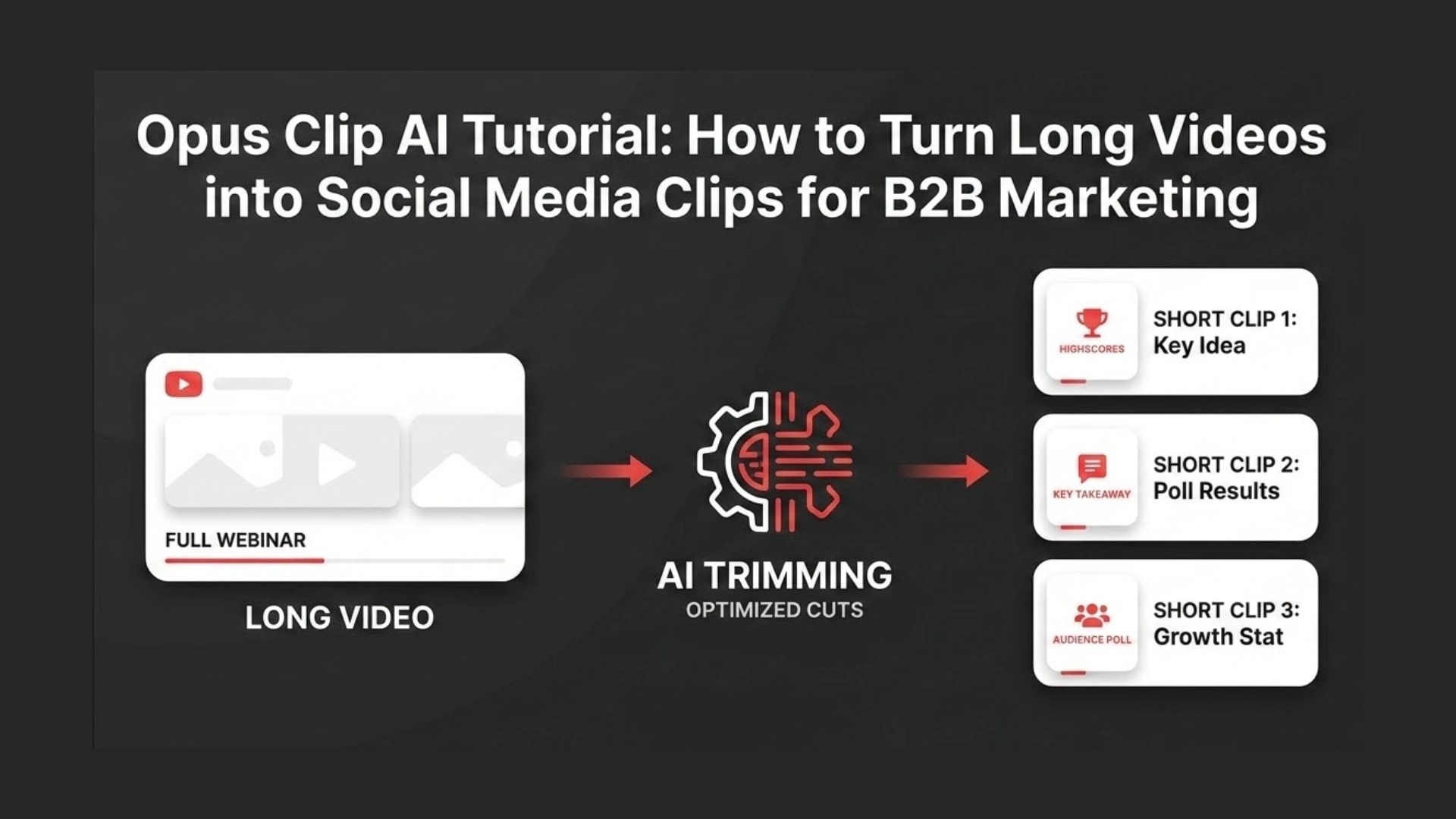
This Opus Clip AI tutorial shows you how to turn one long video into multiple short clips for social media, without starting from scratch every time.
We also looked at where Opus Clip works well, where it needs human review, and what you should check before publishing any AI generated clip.
What Is Opus Clip AI?
Opus Clip is an AI video repurposing tool that turns long videos into short clips for social platforms.
According to Opus Clip, the platform analyzes long videos, finds useful moments, and turns them into short videos that can stand on their own. It also supports publishing to social platforms and accepts video links from platforms like YouTube, Google Drive, Zoom, Vimeo, Loom, Riverside, StreamYard, LinkedIn, and more.
In simple terms, Opus Clip helps you move from this:
One long video.
To this:
Many short clips.
For teams producing webinars, podcasts, interviews, or educational videos, that can reduce the first editing pass.
But it does not remove the need for judgment.
AI can help you find clips faster. You still need to decide whether those clips are clear, useful, accurate, and worth publishing.
We Tested the Workflow Before Writing This Tutorial
We reviewed Opus Clip as a practical content repurposing workflow, not just as a tool description.
The goal was simple:
Can Opus Clip help turn a long video into usable social media clips faster?
We looked at how the tool handles:
- Uploading long form video
- Finding short clip moments
- Adding captions
- Reframing horizontal video into vertical format
- Preparing clips for publishing
- Reviewing AI selected clips before export
The biggest takeaway was clear.
Opus Clip is useful for speed, but human review is still needed for quality.
If the original video has clear speech, strong answers, and clean audio, Opus Clip can quickly suggest useful clips.
If the video is too technical, slow, or context heavy, some AI selected clips may feel incomplete.
That is why the best workflow is not:
Upload and publish.
The better workflow is:
Upload, generate, review, edit, export, publish.
Step 1: Upload Your Long Video
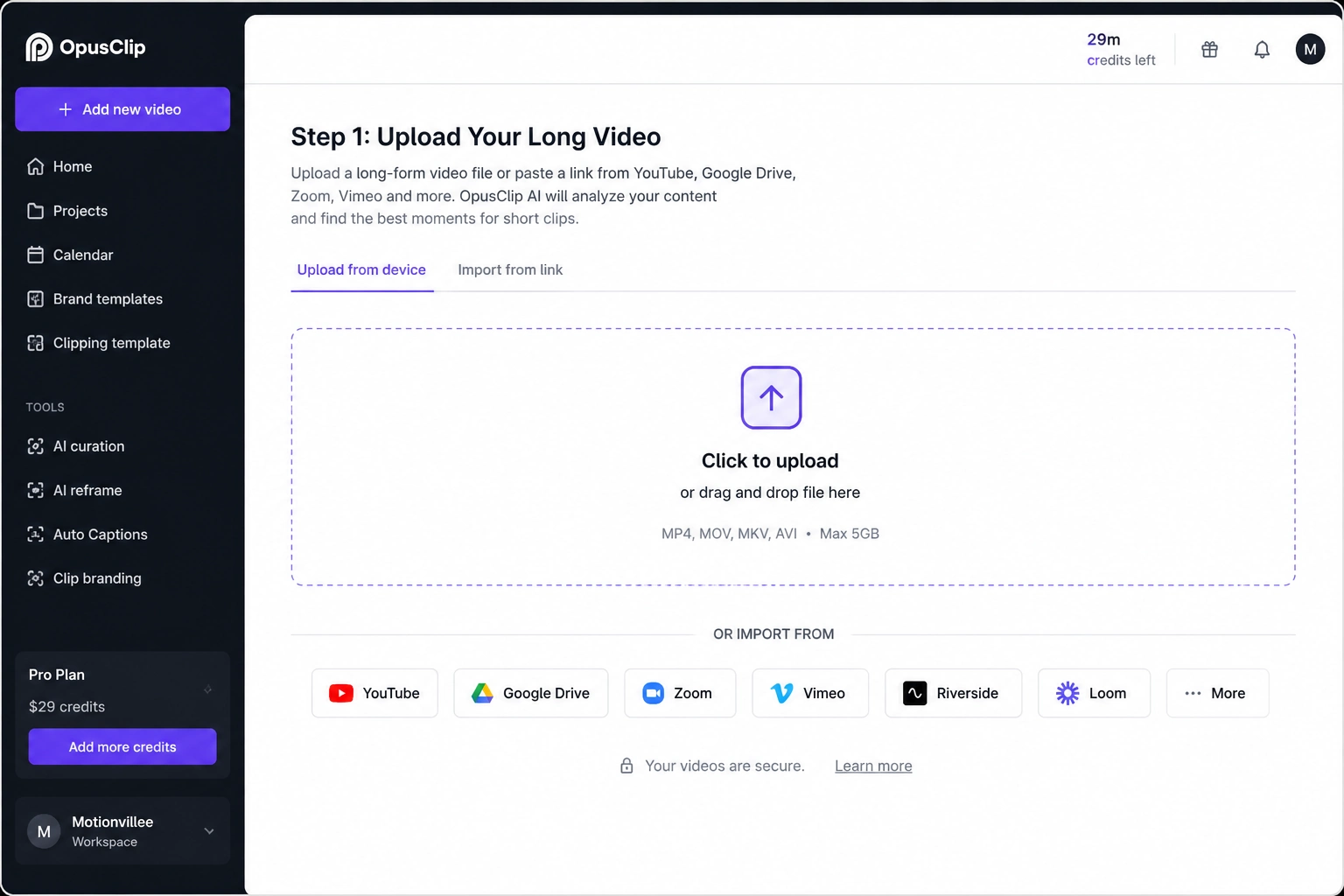
Start by uploading your long form video into Opus Clip.
You can use content such as:
- A webinar
- A podcast
- A YouTube video
- A founder interview
- A customer call recording
- A product walkthrough
- A training session
- A virtual event recording
Opus Clip also allows users to add links from supported platforms, including YouTube, Google Drive, Zoom, Vimeo, Loom, Riverside, StreamYard, LinkedIn, and more.
Before uploading, check the quality of your source video.
A strong source video should have:
- Clear audio
- Minimal background noise
- One clear topic
- Speaker faces visible
- Good lighting if it includes people
- Clear sections or talking points
This matters because AI can only work with what the original video gives it.
If the speaker is unclear, the audio is messy, or the conversation jumps too much, the final clips may need more manual editing.
Step 2: Let Opus Clip Find Short Clip Moments
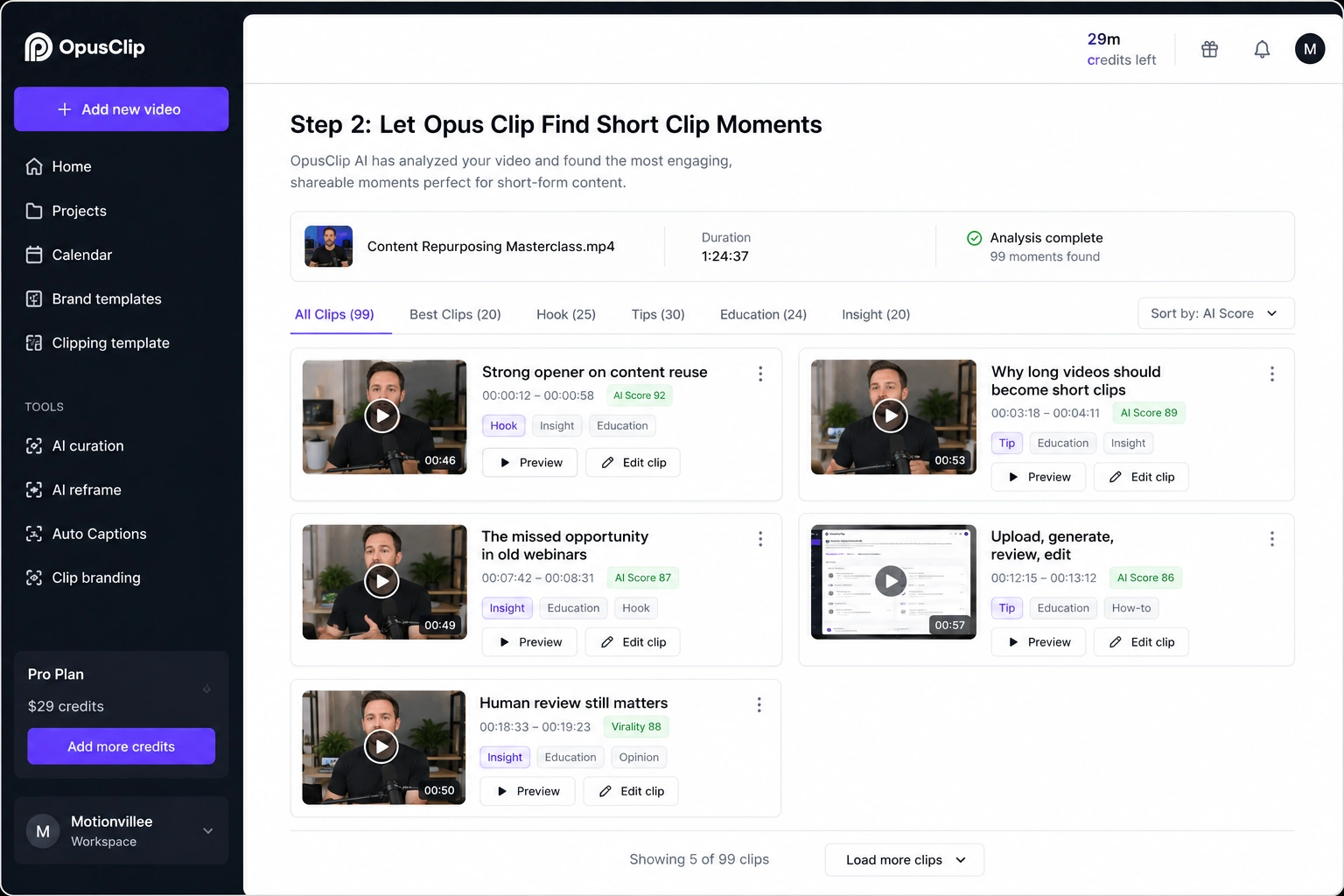
After upload, Opus Clip analyzes the video and suggests short clips.
The tool looks for moments that may work as standalone content.
These can include:
- Strong opinions
- Clear explanations
- Quick tips
- Useful examples
- Emotional moments
- Teaching moments
- Clear answers to common questions
This is where Opus Clip saves time.
Instead of watching the full video again and manually marking every useful section, you get a first list of suggested clips.
But you should not treat the first output as final.
AI may find a good sentence but miss the setup before it.
It may select a strong moment but cut the ending too early.
It may choose a clip that sounds useful but does not make sense without the full conversation.
So use the AI output as a starting point, not the final edit.
Step 3: Review Every AI Selected Clip
You should review every clip before exporting it.
This is the most important step in the whole tutorial.
Do not publish every clip just because the tool selected it.
Check each clip for:
- A clear opening hook
- A complete idea
- No missing context
- Accurate captions
- Correct speaker framing
- Useful takeaway
- Clean ending
- No awkward cuts
A good short clip should make sense without the viewer watching the full video.
For example, this is weak:
“We did that because the previous issue was already affecting conversion.”
This needs context.
This is stronger:
“Most teams do not need more content first. They need to reuse the content they already created.”
The second version works better because the viewer understands it immediately.
That is the difference human review brings.
Step 4: Edit Captions for Accuracy
Opus Clip can generate captions automatically, but you should still check them manually.
Captions are not just decoration.
They help viewers understand the clip when they are watching without sound.
They also help your message land faster.
Check captions for:
- Spelling mistakes
- Wrong names
- Wrong product terms
- Broken sentence flow
- Missing punctuation
- Poor line breaks
- Hard to read text
- Overcrowded caption styling
This is especially important for videos with technical topics, product names, acronyms, finance terms, cybersecurity terms, or SaaS terminology.
Small caption errors can damage trust.
If the clip is meant to support your brand, the caption quality matters as much as the video cut.
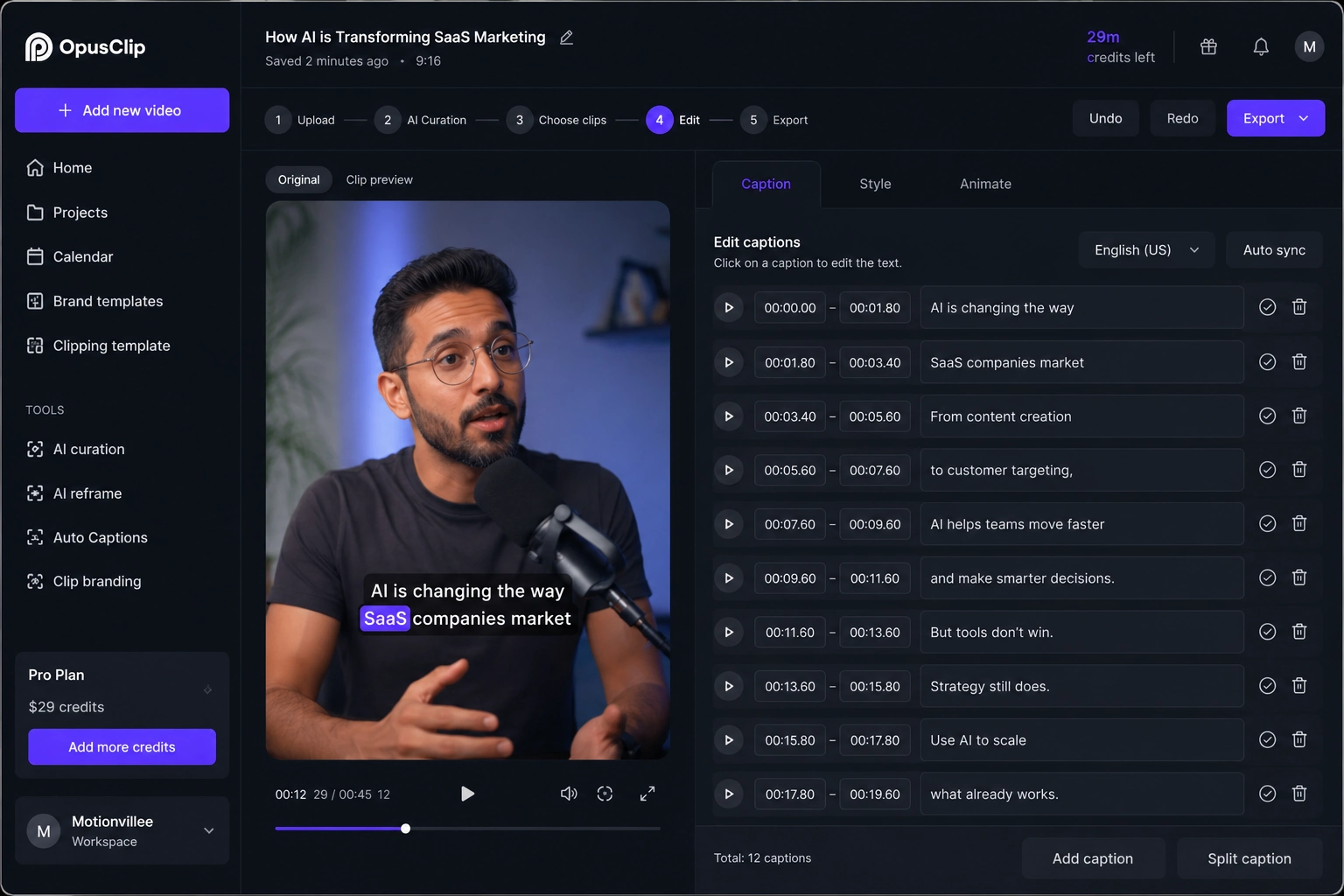
Step 5: Reframe the Video for Vertical Platforms
Most webinars and interviews are recorded horizontally.
Most social clips are consumed vertically.
That means your original video may not fit properly on platforms like:
- YouTube Shorts
- Instagram Reels
- TikTok
- LinkedIn mobile feed
Opus Clip can help reframe video into vertical layouts and keep the active speaker visible.
This reduces repetitive editing work.
But you should still check the final frame.
Make sure:
- The speaker’s face is not cut off
- Captions do not cover the mouth
- Important screen content is visible
- The layout does not feel cramped
- The clip looks clean on mobile
This step matters because format affects watchability.
A good clip can still perform poorly if the viewer has to struggle to read it.
Step 6: Choose the Best Clips to Export
After reviewing and editing, choose only the strongest clips to export.
Do not export everything.
A smaller number of stronger clips is better than a large batch of average clips.
Before exporting, ask:
- Does this clip teach one clear idea?
- Would someone understand it in the first 3 seconds?
- Does it support the brand message?
- Is the caption clean?
- Is the speaker framed properly?
- Does the clip end naturally?
- Is it worth publishing?
If the answer is no, either edit it or skip it.
AI can create volume.
Your job is to protect quality.
Step 7: Export and Publish
Once your clips are ready, export them for the right platform.
Before publishing, check:
- Video length
- Aspect ratio
- Caption readability
- Audio clarity
- Speaker framing
- Brand consistency
- File quality
You can then publish clips across your social channels.
For better results, do not post the same clip everywhere with the same caption.
Adapt the caption to each platform.
For LinkedIn, use a strong business insight.
For YouTube Shorts, use a simple title and direct hook.
For Instagram Reels, keep the caption shorter.
For TikTok, make the opening line sharper and more immediate.
The same video can work across platforms, but the surrounding copy should match how people consume content there.
What Opus Clip Does Well
Opus Clip works best when you already have strong long form content.
The tool is useful for:
- Finding possible short clips faster
- Reducing manual review time
- Creating captions quickly
- Turning horizontal videos into vertical formats
- Helping teams publish more consistently
- Getting more value from webinars and interviews
The biggest benefit is speed.
A long video that might take hours to review manually can become easier to process because the tool gives you clip options first.
That makes Opus Clip useful for teams that already produce regular video content.
Where Opus Clip Still Needs Human Review
Opus Clip is helpful, but it is not perfect.
The tool can still struggle with context.
Common issues include:
- Clips starting too late
- Clips ending too early
- Captions misreading technical words
- Speaker tracking missing key screen details
- Repetitive clip selections
- AI picking a moment that is not actually useful
- Good quotes losing meaning without setup
This matters most when the video is technical, strategic, or product heavy.
AI may understand the words, but it may not fully understand the business meaning.
That is why human review is still necessary.
Technology can speed up editing.
People still protect clarity, context, and trust.
Best Practices for Better Opus Clip Results
You get better clips when the original video is easier to understand.
Before recording your next webinar, podcast, or interview, use a structure that helps both people and AI.
Here are a few simple rules:
- Answer one question at a time
Do not jump across too many ideas in one answer. - Use clear transitions
Phrases like “the first reason is” or “the mistake is” help create cleaner clips. - Keep answers concise
Shorter answers often become stronger clips. - Repeat the main idea clearly
This gives the AI a stronger moment to detect. - Record clean audio
Bad audio creates bad captions and weaker clips. - Avoid too much overlap between speakers
If two people talk over each other, the clip becomes harder to use. - Add strong opening statements
Short clips need fast context.
The better your source video, the better your AI generated clips.
When Should You Use Opus Clip?
You should use Opus Clip when you already create long form video and want more output from it.
It is especially useful for:
- Webinarsawd
- Podcasts
- Interviews
- Coaching calls
- Educational content
- Event recordings
- YouTube videos
- Founder led content
It may not be enough for videos that require deeper creative direction, complex storytelling, brand polish, or careful product positioning.
For those cases, AI can support the workflow, but it should not control the full message.
Final Thought
Opus Clip is not just an editing tool.
It is a content repurposing tool.
If your team already creates webinars, podcasts, interviews, or long form videos, Opus Clip can help you turn those assets into more social content faster.
But the best results come from a balanced workflow.
Let AI speed up the first draft.
Let humans refine the message.
That is how you get clips that are not only faster to produce, but also clearer, more useful, and more trustworthy.