
The 5-Video Minimum: What Every B2B SaaS Needs Before Scaling Paid Ads
Meeting B2B SaaS video requirements prevents wasted ad spend by ensuring every stage of your paid funnel can convert traffic effectively. Companies scaling LinkedIn or Google ads without complete video libraries send qualified clicks to unprepared landing pages, losing 60-70% of ad investment to bounce and abandonment before prospects understand product value.
Why Do B2B SaaS Companies Need Multiple Videos Before Scaling Paid Ads?
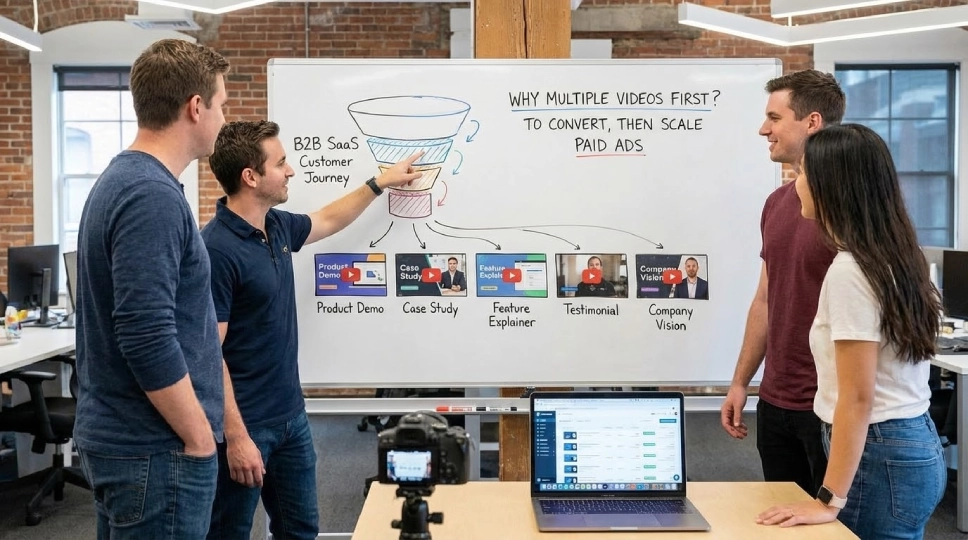
B2B SaaS companies need multiple videos before scaling paid ads because single-video funnels leak traffic at every stage, causing 60-70% of ad spend to produce zero pipeline as prospects abandon when they can’t find answers matching their awareness level and specific concerns.
The paid funnel isn’t linear. Your LinkedIn ads reach CFOs researching budget allocation, mid-level managers comparing features, and technical evaluators checking implementation complexity.
One homepage explainer can’t address all three simultaneously. Each visitor arrives with different questions. Without stage-specific video answers, they bounce.
The Funnel Reality
Top of funnel (problem aware): Need educational content explaining why the problem matters
Middle of funnel (solution aware): Need product demonstrations showing how your solution works
Bottom of funnel (product aware): Need proof through customer testimonials and case studies
Post-conversion: Need onboarding videos reducing time-to-value
Scaling ads without videos for each stage is like building a pipeline with missing sections. Traffic flows in but leaks out at every gap.
The Paid Traffic Difference
Organic visitors forgive incomplete information. They bookmark pages, return later, search competitors, and gradually self-educate.
Paid traffic won’t wait. You paid $8-$15 per click on LinkedIn. They arrived ready to evaluate now. No video matching their stage means immediate exit.
Every missing video costs you the subset of traffic needing that specific answer. Working with SaaS video production services ensures comprehensive coverage.
What Are the 5 Essential Videos Every B2B SaaS Needs?
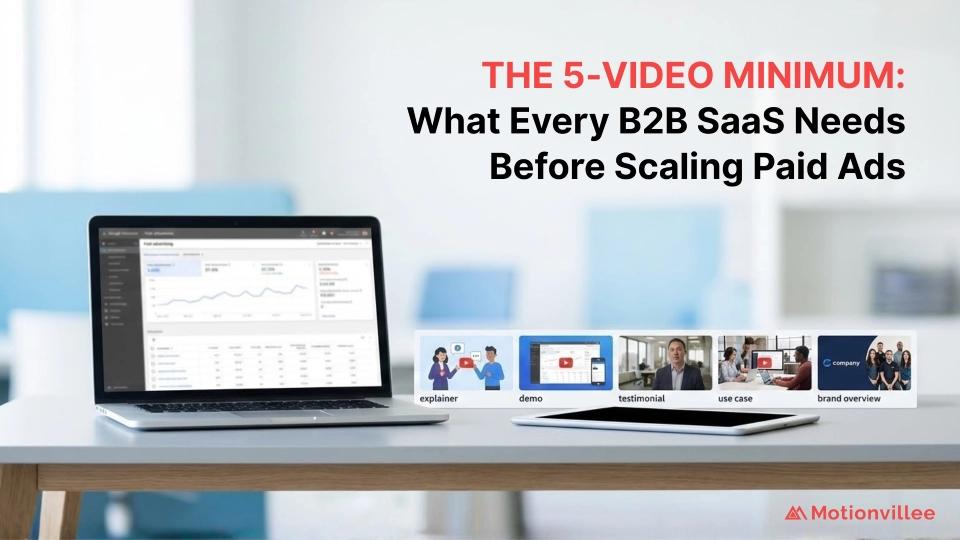
The 5 essential videos every B2B SaaS needs before scaling ads are: homepage explainer (60-90 seconds explaining core value), product demo (2-3 minutes showing key workflows), customer testimonial (90 seconds providing social proof), comparison video (addressing “why not competitors”), and pricing explainer (clarifying value at each tier).
Video 1: Homepage Explainer (60-90 Seconds)
Purpose: Answer “What is this and why should I care?” in under 90 seconds for cold traffic.
Placement: Hero section of homepage, LinkedIn ad landing pages, Google search landing pages
Content: Problem identification, your unique solution approach, primary outcome delivered, clear next step
Why it matters: First-time visitors from paid ads need immediate clarity. Without this, 70% bounce within 15 seconds.
Cost without it: $5,000-$8,000 monthly ad spend producing 800 clicks with 70% immediate bounce = 560 wasted clicks = $3,500-$5,600 monthly loss
Video 2: Product Demo (2-3 Minutes)
Purpose: Show how your product solves specific workflows for prospects past awareness stage.
Placement: Product pages, “How It Works” pages, demo request thank-you pages, middle-funnel ad campaigns
Content: Specific use case walkthrough, key feature demonstrations, integration highlights, user interface clarity
Why it matters: Engaged visitors need to see your product in action before booking demos. Understanding 5 product demo video types helps select the right format.
Cost without it: 40% of engaged visitors who would convert with demo video abandon without understanding implementation
Video 3: Customer Testimonial (90 Seconds)
Purpose: Provide third-party validation that your solution delivers promised outcomes.
Placement: Pricing pages, comparison pages, case study pages, bottom-funnel retargeting campaigns
Content: Customer describing their problem, why they chose you, specific results achieved, recommendation
Why it matters: Bottom-funnel prospects need proof your solution works for companies like theirs. Stats show testimonials increase conversion 34%.
Cost without it: Final-stage prospects comparing options choose competitors with stronger social proof
Video 4: Comparison Video (90-120 Seconds)
Purpose: Address “Why not [competitor]?” objection directly before prospects research alternatives.
Placement: Comparison landing pages, competitive keyword ad campaigns, FAQ sections
Content: Respectful acknowledgment of alternatives, your differentiation clearly stated, specific advantages relevant to your ICP
Why it matters: 78% of B2B buyers compare at least 3 options. Without comparison content, they research competitors and may never return.
Cost without it: Qualified prospects leak to competitors during comparison research phase
Video 5: Pricing Explainer (60-90 Seconds)
Purpose: Clarify value at each pricing tier so prospects self-select correct plan.
Placement: Pricing page, pricing-focused ad campaigns, sales enablement
Content: What each tier includes, who each tier serves best, how to choose, upgrade path clarity
Why it matters: Confused prospects about pricing either don’t convert or choose wrong tier and churn. Clear pricing video reduces support inquiries 40%.
Cost without it: Pricing page visitors abandon due to confusion about tier selection
These five videos create complete funnel coverage ensuring every paid traffic segment finds relevant answers. Creating effective videos requires understanding what makes videos work.
How Much Does Scaling Paid Ads Without Complete Video Library Cost?
Scaling paid ads without complete video library costs $15,000-$25,000 monthly in wasted ad spend as 50-70% of paid traffic abandons at stages lacking video answers, with LinkedIn CPC averaging $5-$15 and Google B2B SaaS CPC ranging $8-$20 based on 2026 market data.
The Real Math on Incomplete Funnels
Monthly paid ad budget: $10,000 (conservative B2B SaaS starting point)
Average blended CPC (LinkedIn + Google): $10
Monthly clicks: 1,000
Without complete video library:
Homepage bounce (no explainer): 70% loss = 700 clicks wasted
Remaining: 300 engaged visitors
Product page abandonment (no demo): 50% loss = 150 clicks wasted
Remaining: 150 considering prospects
Pricing confusion (no explainer): 40% loss = 60 clicks wasted
Final conversions: 90 demos/trials
With complete video library:
Homepage bounce: 35% loss = 350 clicks wasted
Remaining: 650 engaged visitors
Product page abandonment: 20% loss = 130 clicks wasted
Remaining: 520 considering prospects
Pricing conversion: 15% loss = 78 clicks wasted
Final conversions: 442 demos/trials
The Impact
Video library increases conversion efficiency 390% (from 90 to 442 conversions).
At 25% demo-to-close rate and $25,000 ACV: Additional 88 conversions = 22 customers = $550,000 additional annual revenue.
$10,000 video investment preventing $550,000 revenue loss = 5,500% ROI. Building full-funnel video strategy maximizes this return.
What Do These 5 Videos Cost to Produce?
The 5 essential B2B SaaS videos cost $12,000-$28,000 total for professional production, with homepage explainers at $3,000-$6,000, product demos at $4,000-$8,000, customer testimonials at $2,500-$5,000, comparison videos at $2,000-$4,500, and pricing explainers at $2,000-$4,500 based on 2026 USA market rates.
Detailed Investment Breakdown
Homepage Explainer (60-90 sec): $3,000-$6,000
Includes: Full script development, custom 2D animation, professional voiceover, music licensing, 2 revision rounds
Timeline: 3-4 weeks from kickoff to delivery
Product Demo (2-3 min): $4,000-$8,000
Includes: Screen recording with annotations, custom motion graphics overlays, voiceover narrative, polished editing
Timeline: 3-5 weeks including product access and revision cycles
Customer Testimonial (90 sec): $2,500-$5,000
Includes: Customer interview coordination, professional filming (or remote direction), editing, graphics package
Timeline: 4-6 weeks including customer scheduling and approval
Comparison Video (90-120 sec): $2,000-$4,500
Includes: Competitive research integration, diplomatic messaging, animated comparison graphics, voiceover
Timeline: 2-3 weeks
Pricing Explainer (60-90 sec): $2,000-$4,500
Includes: Pricing tier visualization, upgrade path graphics, selection guidance, clear CTAs
Timeline: 2-3 weeks
Total Investment: $13,500-$28,000
Average per video: $2,700-$5,600
Production timeline: 8-12 weeks for complete library if sequenced
Update costs: $800-$2,000 per video for messaging or pricing changes
The ROI Reality
$18,000 average investment enabling $550,000 additional annual revenue = 3,055% first-year ROI.
Payback period: 15-22 days after video deployment based on typical paid funnel velocity.
This assumes conservative $10,000 monthly ad spend. Companies spending $20,000-$50,000 monthly see proportionally larger returns. Learning how to optimize landing pages with video accelerates payback.
When Should B2B SaaS Companies Invest in Complete Video Libraries?
B2B SaaS companies should invest in complete video libraries before increasing paid ad spend beyond $5,000 monthly, as scaling ads without video infrastructure wastes 50-70% of budget through preventable abandonment at funnel stages lacking visual clarity and proof.
The Investment Sequence
Phase 1 ($0-$3,000 monthly ad spend): Build homepage explainer first. This captures highest-volume traffic source.
Phase 2 ($3,000-$8,000 monthly ad spend): Add product demo and customer testimonial. These serve middle and bottom funnel.
Phase 3 ($8,000-$15,000 monthly ad spend): Complete library with comparison and pricing videos. At this spend, incomplete coverage becomes extremely expensive.
Phase 4 ($15,000+ monthly ad spend): Expand library with use-case-specific videos, industry vertical videos, role-specific messaging.
Why Sequence Matters
Building videos after scaling ads means you’ve already wasted months of budget on incomplete funnels.
Example: Company scales to $15,000 monthly ad spend over 6 months before investing in video.
Total ad spend: $45,000
Wasted due to incomplete funnel: $27,000 (60% inefficiency)
Video investment: $18,000
Net position: Spent $63,000 total, wasted $27,000 that video would have saved.
Better approach: Invest $18,000 in video before scaling ads.
Scale ads with complete funnel from month 1.
6-month ad spend: $45,000 with 35% waste instead of 60% = $15,750 waste instead of $27,000.
Savings: $11,250 over 6 months, plus video investment pays for itself.
Understanding when to invest in video prevents this waste.
How Do the 5 Videos Work Together in Paid Funnels?
The 5 videos work together by creating stage-matched content addressing specific questions at each funnel level: explainer for cold traffic awareness, demo for engaged evaluation, testimonial for validation, comparison for competitive consideration, and pricing for purchase decision, preventing abandonment at handoff points.
The Paid Funnel Flow
Stage 1: Awareness (LinkedIn/Google Ad → Landing Page)
Traffic: Cold prospects clicking “SaaS solution for [problem]” ads
Question: “What is this and should I care?”
Video: Homepage explainer (60-90 sec)
Outcome: 65% stay engaged vs 30% without video
Next step: Product page visit or demo request
Stage 2: Evaluation (Product Page)
Traffic: Engaged visitors who understood core value proposition
Question: “How does this actually work for my use case?”
Video: Product demo (2-3 min)
Outcome: 50% proceed to pricing vs 25% without demo
Next step: Pricing page or comparison research
Stage 3: Comparison (Competitive Research)
Traffic: Serious prospects comparing your solution to alternatives
Question: “Why choose you instead of [competitor]?”
Video: Comparison video (90-120 sec)
Outcome: 70% return to your site vs 45% who research competitors and don’t return
Next step: Final evaluation on pricing page
Stage 4: Validation (Social Proof)
Traffic: Near-decision prospects needing confidence in outcomes
Question: “Does this actually work for companies like mine?”
Video: Customer testimonial (90 sec)
Outcome: 34% conversion lift when testimonial video present
Next step: Pricing evaluation
Stage 5: Purchase Decision (Pricing Page)
Traffic: Qualified prospects choosing plan tier
Question: “Which plan fits my needs and budget?”
Video: Pricing explainer (60-90 sec)
Outcome: 40% fewer support inquiries, 25% higher correct-tier selection
Next step: Demo request or trial signup
The Retargeting Layer
Visitors:
Who bounced at homepage: Retarget with demo video showing product value
Visitors who viewed demo but didn’t convert: Retarget with customer testimonial providing proof
Who researched pricing: Retarget with pricing explainer removing confusion
Complete video library enables sophisticated retargeting matching content to behavior. Applying video strategy principles maximizes coordination.
What Happens When B2B SaaS Companies Scale Ads Without These Videos?
B2B SaaS companies scaling ads without complete video libraries waste 50-70% of ad budget through preventable abandonment, see 60-85% higher cost-per-acquisition than video-enabled competitors, and experience 40% longer sales cycles as prospects self-educate through competitor content instead of your owned assets.
The Waste Patterns
Pattern 1: Homepage Abandonment
Without explainer video, 70% of paid clicks bounce within 15 seconds.
At $10 average CPC, every 100 clicks = $1,000 spend with 70 immediate bounces = $700 immediate waste.
Monthly at 1,000 clicks: $7,000 wasted before prospects even understand your value.
Pattern 2: Demo Page Confusion
Engaged visitors reach product pages but can’t visualize implementation.
50% abandon because static screenshots don’t answer workflow questions.
These were your best prospects. You lost them at the moment they most needed help.
Pattern 3: Competitor Leakage
Prospects comparing options research competitors with better video content.
Your solution might be superior, but competitors explain theirs more clearly.
65% of prospects who leave to research competitors never return to your site.
Pattern 4: Pricing Confusion
Bottom-funnel prospects confused by pricing tiers either choose wrong plan (leading to churn) or don’t convert.
Support teams field 300-500% more pricing inquiries than companies with pricing explainer videos.
The Competitive Disadvantage
Your competitors with complete video libraries convert paid traffic 3-4x more efficiently.
You both bid on same LinkedIn audiences. Both pay $8-$12 per click. Both target same job titles.
They convert 15-18% of clicks to demos. You convert 4-6%.
Their cost-per-demo: $67-$80. Your cost-per-demo: $167-$250.
They can afford to bid higher, win more auctions, and dominate your shared audience.
You’re forced into lower-quality traffic sources to compete on cost. This creates death spiral of declining lead quality.
Avoiding expensive mistakes requires video investment before scaling.
How Should B2B SaaS Companies Prioritize Video Production?
B2B SaaS companies should prioritize video production based on current funnel leakage analysis: identify which stage loses most qualified traffic, produce video for that stage first, measure impact, then address next-highest leakage point, typically starting with homepage explainer for new paid programs.
The Prioritization Framework
Step 1: Audit Current Funnel
Where does paid traffic drop off most severely?
Homepage bounce rate above 60%? Start with explainer.
Product page abandonment above 50%? Start with demo.
Pricing page confusion (high exit rate)? Start with pricing explainer.
Step 2: Calculate Stage-Specific Waste
Homepage stage: 1,000 clicks × 70% bounce × $10 CPC = $7,000 monthly waste
Product stage: 300 engaged visitors × 50% abandonment × $10 effective cost = $1,500 monthly waste
Pricing stage: 150 qualified prospects × 40% confusion exit × $10 effective cost = $600 monthly waste
Priority: Homepage (highest absolute waste)
Step 3: Produce and Deploy Highest-Impact Video
Invest in homepage explainer first ($3,000-$6,000).
Deploy across all paid landing pages.
Measure bounce rate reduction (typically 35-45% improvement).
Step 4: Cascade to Next Priority
With homepage bounce reduced, more traffic reaches product pages.
Product page abandonment now represents larger absolute waste.
Produce product demo video next ($4,000-$8,000).
Step 5: Complete Library
Add customer testimonial for bottom-funnel proof.
Comparison video for competitive consideration.
Pricing explainer for purchase clarity.
The Budget-Constrained Approach
If budget limits initial investment to one video:
Choose homepage explainer. This has broadest impact across all paid traffic.
Plan 90-day roadmap for remaining 4 videos.
Allocate 15-20% of monthly ad savings toward next video production.
Example: $7,000 monthly waste reduced to $3,500 by explainer = $3,500 monthly savings.
Allocate $700/month toward next video. Product demo paid for in 6 months from savings alone.
Following strategic video frameworks ensures optimal sequencing.
What Results Can B2B SaaS Expect From Complete Video Libraries?
B2B SaaS companies with complete video libraries see 55-70% reduction in homepage bounce rates, 40-60% increase in product page engagement, 25-40% higher demo request rates, 35-50% shorter sales cycles, and 3-4x improvement in paid ad ROI compared to text-only funnels.
Homepage Performance
Before video: 70% bounce rate, 8-second average time on page
After explainer video: 30-40% bounce rate, 90-second average time on page
Impact: 50-57% more paid visitors engage with your content
Translation: Every $1,000 ad spend produces 500-570 engaged visitors instead of 300
Product Page Conversion
Before demo video: 25% of engaged visitors proceed to pricing
After demo video: 50-60% of engaged visitors proceed to pricing
Impact: 100-140% increase in qualified prospects reaching purchase evaluation
Translation: Demo request rate doubles or triples from same traffic volume
Pricing Page Efficiency
Before pricing explainer: 40% confusion-driven abandonment, 60% correct tier selection
After pricing explainer: 15% abandonment, 85% correct tier selection
Impact: 62% improvement in pricing page conversion, 42% improvement in customer fit
Translation: Lower churn because customers choose appropriate tier from start
Sales Cycle Acceleration
Before complete video library: 45-60 day average sales cycle
After complete video library: 28-38 day average sales cycle
Impact: 35-40% faster pipeline velocity
Translation: Close deals 2-3 weeks faster because prospects arrive at demos pre-educated
Paid Ad ROI
Before videos: $10,000 ad spend → 90 demos → 23 customers → $575,000 revenue (57.5x ROAS)
After videos: $10,000 ad spend → 442 demos → 111 customers → $2,775,000 revenue (277.5x ROAS)
Impact: 383% increase in revenue from same ad investment
Translation: Video library enabling nearly 5x improvement in paid channel efficiency
Companies see results within 2-3 weeks of video deployment. Understanding expected sales impact sets realistic benchmarks.
How Do Complete Video Libraries Change Paid Ad Strategy?
Complete video libraries enable sophisticated paid ad strategies including stage-specific landing pages, behavior-based retargeting sequences, competitive conquest campaigns, and account-based marketing personalization that incomplete funnels cannot support without massive waste.
Strategy Enhancement 1: Stage-Specific Landing Pages
Without videos: Send all paid traffic to generic homepage hoping one message fits everyone.
With videos: Create landing pages for each awareness stage.
Problem-aware ads → Landing page with problem-focused explainer
Solution-aware ads → Landing page with demo video prominent
Product-aware ads → Landing page with testimonials and comparison
Impact: 45-65% improvement in ad-to-conversion match, reducing waste
Strategy Enhancement 2: Behavior-Based Retargeting
Without videos: Retarget everyone with same generic ad hoping something resonates.
With videos: Match retargeting creative to observed behavior.
Homepage bounces → Retarget with demo video teaser
Demo viewers → Retarget with customer testimonial
Pricing page visitors → Retarget with pricing explainer
Impact: 3-4x higher retargeting conversion rate, 50% lower retargeting CPA
Strategy Enhancement 3: Competitive Conquest
Without comparison video: Can’t effectively target competitor keywords without looking defensive.
With comparison video: Run campaigns on “[Competitor] alternative” keywords with landing page featuring diplomatic comparison video.
Impact: Win 15-25% of competitor’s consideration set at 30% lower CAC than organic acquisition
Strategy Enhancement 4: Account-Based Marketing
Without video library: ABM campaigns limited to company logos and generic messaging.
With video library: Create target-account landing pages combining multiple videos for complete journey.
Impact: 40-60% higher target account engagement, 2x faster pipeline from named accounts
Strategy Enhancement 5: Ad Creative Testing
Without videos: Limited to static image and text variations.
With videos: Test video excerpts as ad creative, driving to full video on landing page.
Impact: Video ad creative achieves 25-40% higher CTR and 20-30% lower CPC on LinkedIn
Complete libraries transform paid ads from wasteful spray-and-pray to precise surgical strikes. Exploring 11 video types reveals additional opportunities.
What’s the Biggest Mistake B2B SaaS Companies Make With Video and Paid Ads?
The biggest mistake B2B SaaS companies make is producing one generic homepage video, declaring “we have video,” then scaling paid ads sending diverse traffic segments to single-video page unable to address stage-specific questions, wasting 55-65% of ad spend on traffic needing different content.
Mistake Pattern: The Single-Video Trap
Company invests $5,000 in professional homepage explainer.
Video is excellent. Clear messaging, professional production, strong CTA.
Company scales paid ads assuming “video problem solved.”
Reality: Homepage explainer answers “What is this?” for cold traffic.
It doesn’t answer:
“How does this work?” for engaged evaluators.
“Why not competitors?” for comparison researchers.
“Which tier fits me?” for pricing page visitors.
Result: Improved homepage bounce (from 70% to 40%) but continued massive waste at other stages.
Why This Happens
Teams underestimate diversity of paid traffic intent.
They assume sequential journey: everyone sees homepage first, proceeds through funnel linearly.
Reality: LinkedIn ads segment traffic by role, stage, intent. Different ad creative attracts different mindsets.
Product-focused ad targeting “Director of Engineering” sends highly technical traffic directly to product page.
Without product demo video, this expensive, qualified click immediately bounces.
Homepage explainer wouldn’t have helped. They bypassed homepage entirely.
The Fix
Before scaling paid ads, map every landing page your ads send traffic to.
For each landing page, identify primary question that traffic segment needs answered.
Produce video answering that specific question for that specific page.
Minimum viable video library: 5 videos covering 5 primary landing pages.
Only then scale ad spend knowing every major traffic path has video coverage.
Incomplete coverage means incomplete conversion. Understanding why every SaaS needs video goes beyond single-video thinking.
How Should Companies Deploy These 5 Videos Across Paid Funnels?
Companies should deploy the 5 videos strategically: homepage explainer on all cold traffic landing pages, product demo on evaluation pages and thank-you pages, customer testimonial on pricing and case study pages, comparison video on competitive landing pages, and pricing explainer on pricing pages and bottom-funnel retargeting.
Deployment Map
Homepage Explainer Placement:
Primary: Homepage hero section (auto-play muted or prominent thumbnail)
Secondary: All paid ad landing pages for cold traffic campaigns
Tertiary: Email signature video links for outbound sales
Retargeting: Site visitors who bounced within 10 seconds
Product Demo Placement:
Primary: Product/features page above fold
Secondary: “How It Works” dedicated page
Tertiary: Demo request thank-you page (while they wait for meeting)
Retargeting: Homepage viewers who didn’t proceed to product page
Customer Testimonial Placement:
Primary: Pricing page (above pricing tiers)
Secondary: Case studies page and customer stories section
Tertiary: About/Company page for credibility
Retargeting: Product page viewers who didn’t convert
Comparison Video Placement:
Primary: Dedicated comparison landing pages (“[Brand] vs [Competitor]”)
Secondary: FAQ section addressing competitive questions
Tertiary: Sales enablement content for demo calls
Retargeting: Users who visited then searched competitor names
Pricing Explainer Placement:
Primary: Pricing page above tier selection
Secondary: Pricing-focused ad campaign landing pages
Tertiary: Trial signup flow to guide tier selection
Retargeting: Pricing page visitors who exited without converting
The Auto-Play vs Click-to-Play Decision
Homepage explainer: Auto-play muted. Visitors can unmute if interested. Balances engagement with user control.
Product demo: Click-to-play. These are longer videos for engaged audiences willing to actively watch.
Customer testimonial: Auto-play muted on pricing page. Visitors making purchase decisions appreciate passive social proof.
Comparison video: Click-to-play. Visitors actively researching competitors will engage deliberately.
Pricing explainer: Auto-play muted. Confusion is barrier, passive video removes it.
Mobile Optimization
60% of paid traffic comes from mobile devices. All videos must load fast and play smoothly on mobile.
Keep videos under 100MB file size for smooth mobile streaming.
Test auto-play functionality across iOS and Android.
Provide captions for muted auto-play viewing.
Following best placement practices maximizes impact.
When Should B2B SaaS Companies Expand Beyond the 5-Video Minimum?
B2B SaaS companies should expand beyond the 5-video minimum when monthly ad spend exceeds $20,000, when serving multiple distinct buyer personas, when operating in multiple verticals, or when international expansion requires localized content, as increased traffic volume and segmentation demand more specific video answers.
Expansion Trigger 1: Ad Spend Threshold
At $20,000+ monthly ad spend, you can afford sophisticated segmentation.
Different campaigns for different roles (CFO vs CTO vs COO).
Different campaigns for different company sizes (SMB vs Mid-Market vs Enterprise).
Each segment needs role-specific or size-specific messaging.
Expansion: Create persona-specific variations of core 5 videos.
CFO-focused explainer emphasizing financial outcomes.
CTO-focused demo emphasizing technical architecture and integrations.
COO-focused testimonial from operational efficiency customer.
Expansion Trigger 2: Multiple Buyer Personas
Your ICP includes distinct roles with different priorities.
Finance teams care about cost and ROI.
IT teams care about security and integration.
Operations teams care about efficiency and scalability.
Generic videos don’t resonate with any specifically.
Expansion: Build persona-specific video libraries (3-5 videos per major persona).
Expansion Trigger 3: Vertical Specialization
You serve multiple industries (healthcare, finance, manufacturing).
Each has industry-specific compliance concerns, use cases, and terminology.
Generic videos miss industry-specific proof points.
Expansion: Create vertical-specific case study and demo videos.
Expansion Trigger 4: International Growth
Expanding to non-English markets requires localized content.
Not just translation, but cultural adaptation of messaging.
Expansion: Produce localized versions of core 5 videos for each major market.
The Expansion Sequence
Don’t expand until core 5 videos prove impact.
Measure baseline performance with core library.
Identify highest-value expansion opportunity based on traffic segment size.
Produce expanded content for that segment.
Measure incremental lift before next expansion.
Typical expansion investments: $15,000-$35,000 for 5-8 additional specialized videos.
Exploring scaling strategies guides expansion decisions.
What’s the Opportunity Cost of Delaying Complete Video Libraries?
Delaying complete video libraries costs B2B SaaS companies $3,000-$7,000 monthly per $10,000 in ad spend through preventable abandonment waste, with 6-month delay totaling $18,000-$42,000 in lost efficiency that exceeds the $12,000-$28,000 investment required to build complete libraries.
The Delay Calculator
Current monthly ad spend: $10,000, waste rate without videos: 60%, and Current monthly waste: $6,000
Waste with complete video library: 20%
Waste reduction: $4,000 monthly savings
3-month delay cost: $12,000 in preventable waste
6-month delay cost: $24,000 in preventable waste
12-month delay cost: $48,000 in preventable waste
Video library investment: $18,000 average
Break-even: 4.5 months (at which point delay waste equals video investment)
After break-even, every additional month of delay costs $4,000 in pure waste that video would prevent.
The Competitive Disadvantage Amplification
Every month you delay, competitors with video gain advantages:
They convert your shared audience more efficiently.
They can bid higher for same keywords and still profit.
And they push you out of top auction positions.
You’re forced into lower-quality remnant traffic.
Your cost-per-acquisition increases while theirs decreases.
This creates compounding disadvantage. 6-month delay doesn’t just cost you 6 months of waste.
It puts you 6 months behind competitors in conversion efficiency, forcing 12-18 months to catch up.
The Growth Constraint
Companies without video libraries can’t profitably scale ads beyond certain threshold.
At 60% waste rate, you need 2.5x ROI just to break even (because 60% of spend produces zero return).
This limits how much you can spend while maintaining positive ROI.
With 20% waste rate (video-enabled), you need only 1.25x ROI to break even.
This allows 2-3x larger ad budgets while maintaining same profitability.
Delay means constrained growth because your funnel can’t support scale.
Your Q1 2026 video decision determines whether you lead or follow for entire year. Building complete SaaS video strategy eliminates this opportunity cost.
Conclusion
Meeting B2B SaaS video requirements before scaling paid ads transforms wasteful campaigns into efficient pipeline engines. The 5-video minimum ensures every traffic segment finds stage-appropriate answers preventing 50-70% waste typical of incomplete funnels.
Companies investing $12,000-$28,000 in complete video libraries see 3-5x improvement in paid ad ROI within 30 days as homepage bounce drops 50%, demo requests double, and sales cycles shorten 35%.
Your paid funnel either systematically converts traffic or systematically wastes it. Video infrastructure determines which. Every month of delay costs more than video investment itself.
Ready to build your complete video library before Q1 ad scaling? Schedule a strategy call with Motionvillee video production to map your 5-video minimum and deployment timeline.